Weather - Accurate Weather App
- 4.4
- Rating
- 5.00M
- Installs
- Free
- Price
 Analysis by App-foxy
Weather apps are easy to install and surprisingly difficult to keep. I usually give one a few days before deciding whether it deserves a permanent place on my phone, because a polished first look means little if checking the forecast becomes slow, noisy, or unreliable in everyday situations. Weather - Accurate Weather App made a good first impression for me by keeping its purpose clear: it is a free weather app from Coocent, built around current conditions, hourly and daily forecasts, and severe weather alerts. It is available to everyone, and its broad Android compatibility makes it accessible to people using devices running Android 7.0 or later.
What matters here is not novelty. A weather app earns its space by helping me make small decisions repeatedly: whether to carry a jacket, when to walk the dog, whether a commute needs extra time, or if an outdoor plan should move indoors. After using this app with that standard in mind, I see it as a practical option for people who want a straightforward forecast companion rather than a heavily customized weather dashboard. Its lasting value comes from quick routine checks, not from turning weather into an elaborate hobby.
How the first week feels in everyday use
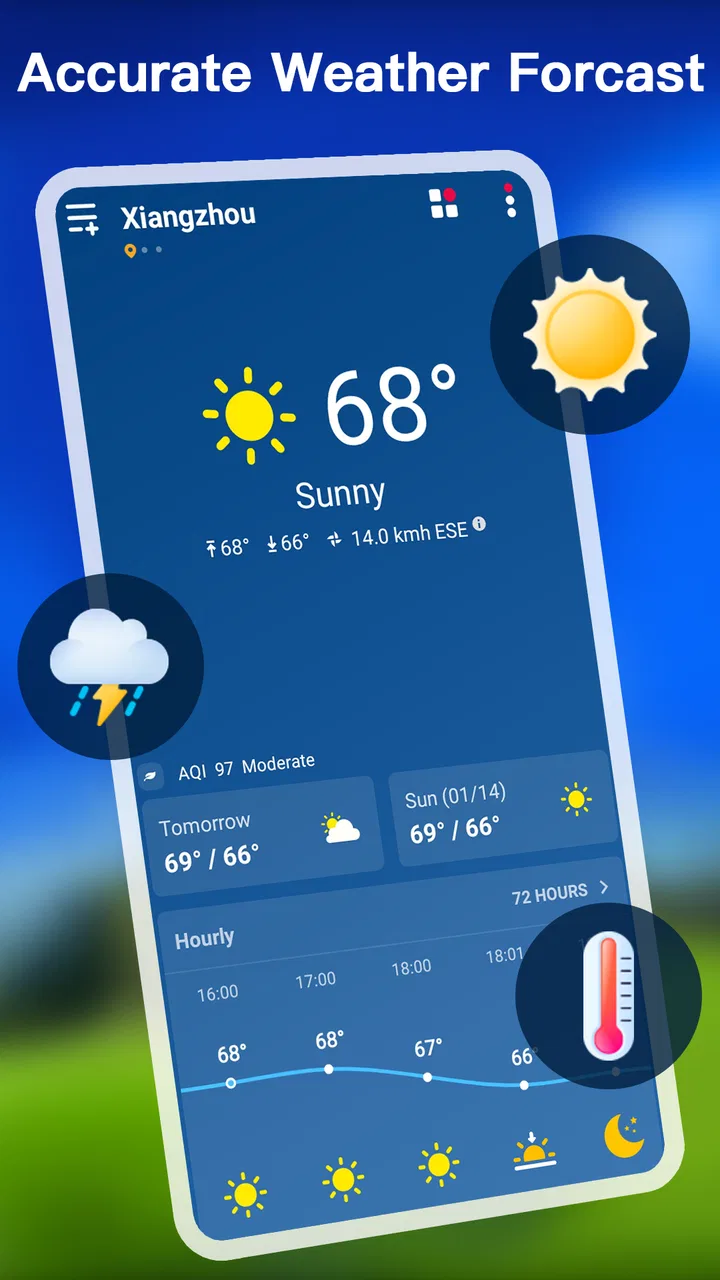
During the first few days, the strongest part of the experience is the basic forecast rhythm. I can look at the current weather, then move naturally to the next few hours or the broader daily outlook. That sequence matches how most people actually use a weather app: first checking what is happening now, then asking what will happen later. I do not need a detailed meteorological explanation to decide what to wear or whether to leave home yet.
You May Also Like

 Blood Strike: 2.5 Anniversary
Blood Strike’s Loadouts Turn Every Drop Into a Tactical Gamble
A close look at Blood Strike’s custom loadouts: how fast access to signature weapons reshapes its battle royale rhythm, rewards preparation, and narrows the gap between fights.

 Pandora - Music & Podcasts
Pandora’s Music Is Easy to Start, but Harder to Recover
Pandora’s strength is its low-effort path from a seed to a station. Its weak spot is how much confidence it asks you to place in connection, setup, and quiet recovery.

 8 Ball Pool
 Is Built on Rivalries, Rematches, and Routine
A close look at the rivalries, rematches, shared routines, and unanswered safety questions that turn a quick pool match into a persistent mobile community.

 Samsung Music
’s Quiet Strength Is Playing What You Already Own
Its reach comes less from spectacle than from dependable access to a personal library. That simplicity is both the app’s strongest retention engine and its ceiling.

 AccuWeather: Weather Radar
AccuWeather Review: A Quick, Clear Forecast for Everyday Decisions
For everyday plans, the best forecast is the one you can understand quickly. AccuWeather makes rain timing, radar, and local conditions easy to act on, with a few trade-offs.

 Hill Climb Racing
Why Hill Climb Racing Still Turns Crashes Into One More Run
A tiny car, a bumpy hill and one more upgrade: Hill Climb Racing keeps resurfacing because its simple chaos makes every near-miss feel personal.
More From Our News Desk



The hourly view is especially useful for short plans. A daily forecast might tell me that rain is possible, but an hourly view helps me judge whether a brief errand is better before lunch or later in the afternoon. I would still treat any forecast as guidance rather than a promise, particularly when conditions are changing quickly, but the ability to narrow a day into smaller time windows makes the information more actionable.
The daily forecast serves a different purpose. I use it when planning several days ahead, such as arranging laundry, choosing a day for a walk, or deciding whether an outdoor appointment needs a backup plan. It is not a replacement for checking again before leaving, but it gives me enough context to avoid making plans blindly. This separation between immediate and longer-range checking is one reason the app feels useful early on.
Severe weather alerts add another layer of practical value. I do not want an alert for every minor change, but I do want a warning to interrupt my normal routine when conditions may require attention. In that sense, alerts are most valuable when I have already formed the habit of checking the app and understand that an alert is a prompt to reassess plans, not an instruction to panic. I would keep notification settings under review so the feature remains helpful rather than becoming background noise.
The app’s store presence also suggests that it is not an obscure experiment. It has passed five million installs and holds an average rating of 4.4 from around fifty-two thousand ratings. Those figures do not guarantee that every forecast will suit every location, but they do indicate that many Android users have found the basic approach worthwhile. I see that as a reason to try it, not as a substitute for judging it against local weather accuracy.
One useful first-week habit is to compare the hourly forecast with what I actually experience instead of assuming the app is always right. I pay attention to whether the timing of rain, temperature changes, and alerts generally matches my area. That simple check is more informative than a single impressive forecast. Weather varies by location, and a forecast that works well for one neighborhood may feel less precise a short distance away.
Who gets the most from the simple layout
This app suits people who want a familiar weather routine without spending time configuring a large collection of panels. A commuter can check conditions before leaving. A parent can look ahead before planning a playground visit. Someone who works outdoors can use the hourly view to identify a more comfortable window, while severe weather alerts provide an additional reason to keep notifications available.
It is also a reasonable starting point for someone moving away from a basic phone widget. The free price removes a major barrier, and the Everyone content rating makes it suitable for a broad household audience. I would recommend it to a friend who asks for a clear weather tool and does not need specialized information such as detailed radar analysis, professional station data, or extensive climate records.
On the other hand, I would not choose it automatically for a weather enthusiast who wants to study storms in depth. A dedicated radar or meteorology service may be a better companion for tracking storm cells, comparing multiple observation sources, or making decisions where fine-grained local detail matters. The strength of this app is the everyday forecast loop, so demanding a specialist instrument from it would be unfair.
Why it can remain useful after the novelty fades
The first-week appeal of a weather app is usually visual: the forecast is easy to read, the current conditions are immediately available, and alerts make the product feel attentive. The harder test arrives later, when checking the weather becomes an ordinary habit. In my experience, this app has a reasonable chance of surviving that test because its main functions correspond to recurring needs rather than one-time curiosity.
Month to month, I would use the hourly outlook for decisions within the same day and the daily view for planning the next several days. That division prevents me from asking one forecast panel to answer every question. If I am deciding whether to cycle home, I care about the next few hours. If I am organizing a weekend visit, I need the wider pattern. The app becomes more useful when I choose the view based on the decision in front of me.
A practical workflow is to check once in the morning for the day’s general shape, then look again shortly before a weather-sensitive activity. I would not keep reopening it every few minutes, because forecasts rarely improve my decision that quickly. This is a small but important trade-off: the app supports frequent checking, but its real value comes from checking at sensible moments and acting on the information.
For travel within a familiar area, the daily forecast can help with packing and scheduling, while the hourly forecast is better for the departure window. I would still verify conditions close to the journey, especially when severe weather is possible. The app can support a plan, but it should not encourage false confidence several days in advance.
Another lasting use is routine adjustment. If I notice that a hot afternoon is followed by a cooler evening, I can move exercise earlier or later. If rain is expected near a regular school run, I can prepare clothing and allow more time. These are not dramatic features, but they are exactly the kind of repeated, low-effort decisions that determine whether a weather app remains installed.
Coocent’s app is also easier to justify as a long-term tool because it is free. I do not have to decide whether occasional weather checks justify a subscription or a purchase. That does not make it automatically better than paid alternatives, but it changes the value calculation for casual users. Someone who checks forecasts only a few times each week may prefer a free app that covers the essentials rather than paying for advanced layers they will rarely open.
Maintenance is light, but the habit still needs attention
The maintenance burden is not only about updates. It is also about keeping notifications meaningful, checking that the app is still useful for the places I visit, and resisting the temptation to treat every change as urgent. The current version is 1.6.4, so I would keep it updated through the normal app-store process and reassess the experience after updates rather than assuming the first impression will remain unchanged forever.
Notifications deserve particular care. Severe weather alerts can be valuable because they bring important information forward, but too many interruptions can make me disable everything. My preference would be to keep genuinely important alerts enabled while avoiding unnecessary notification clutter wherever the app’s controls allow that distinction. A weather app that is ignored because it is too noisy has failed its long-term purpose, even if its forecasts are useful.
I would also avoid relying on the app as my only source during serious weather. An alert should lead me to take sensible precautions and consult appropriate local guidance when needed. This is not a criticism unique to Coocent; it is a sensible boundary for any general-purpose weather application. A phone forecast is convenient, but it is not the same thing as emergency planning or official local instructions.
Location habits can affect convenience as well. If I am checking conditions for a place different from where I currently am, I need to make sure I am looking at the intended location rather than assuming the current forecast applies. This matters when commuting, traveling, or comparing home with a destination. The most common weather-app mistake is often not a bad forecast, but reading the right forecast for the wrong place.
For long-term use, I would judge the app by whether it reduces decisions rather than creating them. If I open it and immediately know whether I need a coat, whether rain may affect my plans, and whether a warning deserves attention, it is doing its job. If I find myself repeatedly searching for deeper maps or alternate observations, that is a sign that I have outgrown its intended level of detail.
Where repeated use can become tiring
The main source of fatigue is the unavoidable uncertainty of weather forecasting. Even a well-presented forecast can feel disappointing when conditions change or timing is off. The app’s wording may make the information easy to approach, but no interface can remove the need for judgment. I would be cautious about treating a daily icon as a guarantee, particularly for outdoor plans that cannot be rearranged easily.
Alerts can create a second kind of fatigue. Their value depends on relevance and timing. If I receive warnings that do not affect my plans, I may gradually stop paying attention. That is why I see alert management as part of using the app well rather than a one-time setup task. The feature is most useful when it preserves a sense of importance instead of becoming another stream of notifications.
There is also a trade-off between simplicity and depth. A general weather app is convenient precisely because it does not ask me to interpret a large amount of technical information. However, when I need to understand why conditions are changing, the simple forecast may not answer enough questions. A radar-focused app, a local weather service, or a specialist forecast source can be better for storm tracking, hiking in uncertain conditions, or professional outdoor work.
People who want extensive personalization may also prefer a different option. If the main goal is to build a highly customized dashboard with many layers, widgets, historical comparisons, and specialist observations, this app’s everyday orientation may feel limited. I would not call that a defect; it is a mismatch between the product’s practical focus and the user’s expectations.
Another potential frustration is that the app’s broad Android support does not mean every phone will feel identical. Screen size, system notification behavior, and device settings can affect how comfortably a weather app fits into a routine. On an older phone, I would pay attention to whether opening the forecast feels quick enough and whether alerts behave as expected. Those details matter more over months than during a short trial.
Finally, the phrase “accurate weather” should be interpreted sensibly. I found the app most convincing when using it as a planning aid, not as an authority that eliminates uncertainty. Forecast quality can depend on location, timing, and rapidly changing conditions. The honest way to use it is to notice its pattern of usefulness in your own area and keep a second source available for situations where precision carries greater consequences.
Small workflows that make the app more useful
My preferred workflow begins with the daily outlook, then moves to the hourly forecast only when I have a specific plan. This avoids getting lost in details that do not change my decision. For example, if I am deciding whether to wash clothes outside, I care about the likely conditions during drying time rather than repeatedly studying the entire week.
For an outdoor appointment, I would check the forecast once while planning, again on the day itself, and pay attention to any severe weather alert. That three-step approach balances preparation with realism. It also prevents the common mistake of making a firm decision based on a forecast that is several days old.
When the forecast looks uncertain, I would build flexibility into the plan instead of searching endlessly for reassurance. The app is more valuable when it helps me identify risk and prepare a backup. If rain may arrive around a walk, I can choose a shorter route or carry suitable clothing. If severe weather is signaled, I can reconsider the activity altogether.
These workflows reveal the app’s best quality: it can become a quiet background utility. I do not need to explore it for entertainment or learn a complicated system. I simply return when weather affects something I am about to do. That is a stronger foundation for long-term retention than a flashy first session.
My long-term verdict on keeping it installed
Weather - Accurate Weather App earns a place on my phone if I want a free, general-purpose forecast tool that covers current conditions, hourly planning, daily outlooks, and severe weather alerts without demanding specialist knowledge. Its 4.4 average from roughly fifty-two thousand ratings and more than five million installs make it a credible choice to test, while the Everyone rating and Android 7.0 minimum make it approachable for many households.
I would recommend it to casual users, commuters, families, and anyone who wants a dependable daily checking habit. The app is particularly suitable when the important question is practical and immediate: should I leave now, take another layer, change the time of an errand, or prepare for difficult weather? Its free availability makes that convenience easy to maintain over time.
I would steer a different user toward a more specialized alternative if they need detailed radar, professional-grade observations, advanced storm analysis, or unusually deep customization. I would also avoid relying on any single app for high-stakes weather decisions. In those cases, local official guidance and specialist tools deserve priority.
For me, the deciding factor is whether the app stays useful once the initial curiosity disappears. It does, provided I use the hourly and daily views for different planning jobs, keep alerts from becoming overwhelming, and remember that forecasts are estimates. If you want a calm, repeatable weather routine rather than an overloaded dashboard, this is a sensible app to keep around. It is not the final word for every weather situation, but it delivers enough recurring value to justify its place for everyday planning.
FAQs for Weather - Accurate Weather App
01What features does the Weather - Accurate Weather App offer?
The Weather - Accurate Weather App provides real-time weather updates, detailed forecasts, and alerts for severe weather conditions. It includes widgets for easy home screen access, radar maps for tracking precipitation, and customizable notifications to keep you informed about weather changes in your area.
02Is the Weather - Accurate Weather App free to use?
Yes, the app is free to download and use. However, it offers optional in-app purchases and a premium subscription to unlock additional features such as ad-free experience, advanced radar options, and extended forecast reports. Users can choose to upgrade based on their preferences.
03How accurate are the forecasts provided by the app?
The app sources data from reputable meteorological services to ensure high accuracy. It uses advanced algorithms to analyze various weather models, providing precise short-term and long-term forecasts. Users can rely on its real-time updates and alerts for planning their daily activities.
04Does the app require an internet connection to function?
Yes, an internet connection is necessary for the app to fetch the latest weather data and updates. While offline features are limited, users can still access previously downloaded forecasts. For real-time alerts and radar updates, a stable internet connection is recommended.
05Is the app compatible with both Android and iOS devices?
Absolutely, the Weather - Accurate Weather App is available on both Android and iOS platforms. It supports a wide range of devices, ensuring a seamless experience regardless of the operating system. Users can download it from Google Play Store for Android or the App Store for iOS.
Pros
- Highly accurate weather forecasts
- User-friendly interface design
- Customizable notifications
- Detailed hourly updates
- Minimal data usage
Cons
- Limited free version features
- Ad interruptions in free mode
- Requires internet for updates
- Occasional widget bugs
- No radar map in free version

Weather - Accurate Weather App
Gallery